
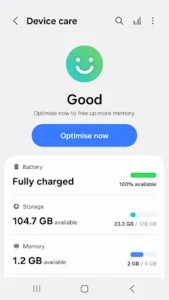
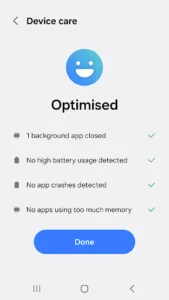
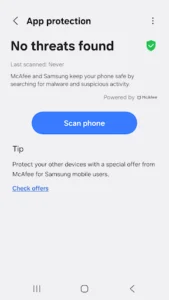
The Device Care app, developed by Samsung Electronics, helps Galaxy smartphone users monitor and maintain their device’s health. It provides a quick overview of the smartphone’s current condition, presented on a 100-point scale, and allows for one-click optimization to improve performance. Beyond general maintenance, the app also includes tools to manage battery life, free up memory, and offers real-time protection against malware like viruses and spyware, aiming to keep the device running smoothly without requiring expert knowledge.
Device Condition Monitoring and Optimization
The app offers a quick assessment of your Galaxy smartphone’s health, displaying its current state as a score out of 100. This feature allows users to check their device’s condition at a glance. Furthermore, it includes a simple one-click optimization function designed to help maintain the smartphone’s performance without requiring advanced technical expertise.
Battery Usage Analysis and Power Saving Modes
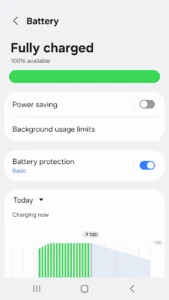
Users can analyze battery consumption on a per-app basis, allowing them to identify which applications are draining power. The App power monitor feature checks for unused apps to help save battery power. For extended usage, Device Care provides both a Power saving mode and a Maximum power saving mode, which can be activated to prolong the smartphone’s battery life.
Memory Management
The app includes tools for efficient memory management, enabling users to free up system memory when needed. This helps in maintaining the smartphone’s responsiveness by managing active processes and cached data.
Malware Detection and Real-Time Protection
Device Care is equipped to detect malware, including viruses and spyware, that may affect your smartphone. It also provides real-time protection to help safeguard the device against such threats, allowing users to take prompt action if a problem arises.
Convenience Widgets
For easier access to its functions, the app offers two different widget types. These widgets provide customer convenience by placing key features directly on the smartphone’s home screen.
Device and Update Specifics
It is important to note that some Galaxy devices may not support all features offered by the app. Additionally, app updates via the Google Play Store are available only on a subset of devices. The app requires Notifications permission to inform users about updates and events, though basic functions remain accessible even if this optional permission is not granted.



















Write a review